AI image generator on GitHub
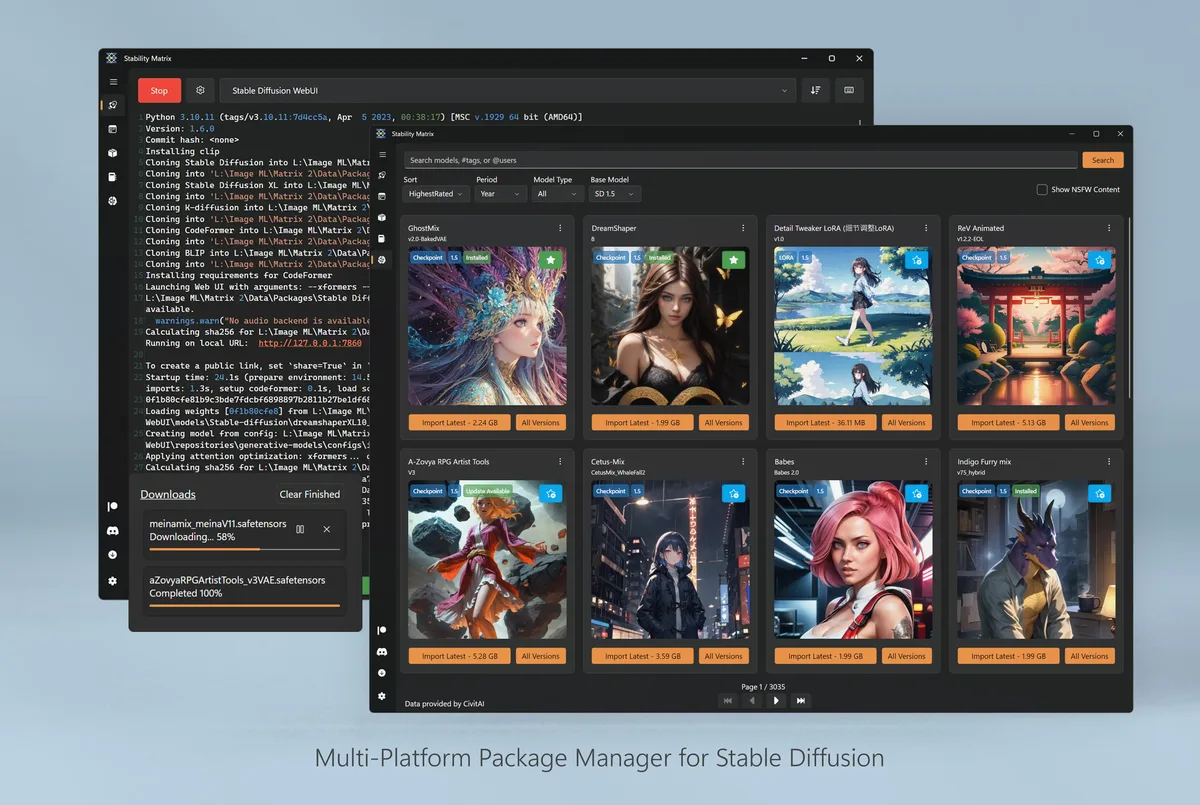
Stability Matrix is an open-source launcher people use as a local AI image generator. The repository LykosAI/StabilityMatrix holds the desktop app under AGPL-3.0, ships Windows, macOS, and Linux assets on Releases, and documents one-click package installs in the README.
Licence and trademark posture
Read the LICENSE file on the repository for AGPL-3.0 terms. You can run, study, and redistribute under that licence. Trademark and logo rights still belong to the upstream project. This install guide uses the product name only to identify the software behind the AI image generator job.
What the repo contains
The README describes a multi-platform package manager, a shared checkpoint library, model browsers for public model hosts, and an optional Inference workspace. Those pieces are why readers treat Stability Matrix as a local AI image generator toolkit rather than a single frozen UI zip.
Release tags use a v prefix. Desktop assets for the three major OS families sit on the same tag. Build-from-source instructions belong in upstream contributing docs; most readers should take the published zip or DMG instead of compiling on day one.
Stars and activity
Star counts and the newest tag date appear in the footer and GitHub stats widgets from live fetch data. Prefer those live numbers over screenshots. Security reports follow the repository security page rather than public issues that might expose private prompts or model paths.
How this guide uses the repo
Asset names, licence string, and install doors in this AI image generator guide are checked against Releases and README. When upstream renames an asset, the fetch step updates picks for the InstallPanel. Related: releases, download safe, safety.
Issues versus support
GitHub Issues are for product bugs and features. They are not a place to paste private prompts, API keys, or full model folder trees. For install questions specific to this guide’s wording, use the contact page. For upstream behaviour, read the wiki and Discussions if the project enables them.
Forks and mirrors
Search results sometimes surface forks that repackage the AI image generator launcher. Prefer LykosAI/StabilityMatrix unless you have a deliberate reason to trust another owner. A fork that only changes the README while shipping unsigned binaries is a common trap.
| Field | Value |
|---|---|
| Repository | LykosAI/StabilityMatrix |
| Licence | AGPL-3.0 |
| Release prefix | v |
| Primary Windows asset | StabilityMatrix-win-x64.zip |
Building from source
Advanced users can clone the repository and follow upstream build docs. That path is slower than the published AI image generator zip and is easy to get wrong on a locked-down PC. Prefer Releases for the first install, then consider source builds when you need patches.
Wiki and docs
The project wiki and README cover package lists, portable data directories, and inference features. Link those official docs when a reader needs depth beyond install. This site stays focused on getting the AI image generator launcher installed cleanly.
- Releases for binaries
- README for feature scope
- SECURITY for vulnerability reports
Independent guide boundary
Moss Lantern publishes this install guide and is not the LykosAI development team. Upstream roadmaps, Discord support, and package plugins remain on official channels. Corrections to guide wording belong on contact.
Operational checklist
Before you hand a machine to someone else, write down the AI image generator asset name, the data directory path, and the package you proved. Those three lines prevent adware shortcuts and confused helpdesk tickets. Prefer GitHub Releases for LykosAI/StabilityMatrix whenever the next upgrade is due.
If policy blocks unknown binaries, stop rather than force a wrapper. Use an approved cloud studio temporarily, then return to the local AI image generator path when you control the PC again. Independence from upstream means this guide can recommend hygiene without replacing official support channels.
Storage and backups
Checkpoints and packages grow quickly. Keep the data directory on a volume with free space, and back it up before reimaging. A portable layout helps when you move an AI image generator library between disks, but only after you confirm launches still work.
Document GPU driver versions beside the asset name when your shop cares about reproducibility. Driver mismatches look like mysterious package failures. Fix the environment before you replace a healthy launcher zip.
- Match filenames on Releases.
- Prove one package after every upgrade.
- Keep one update door forever.