Set up an AI image generator on this computer
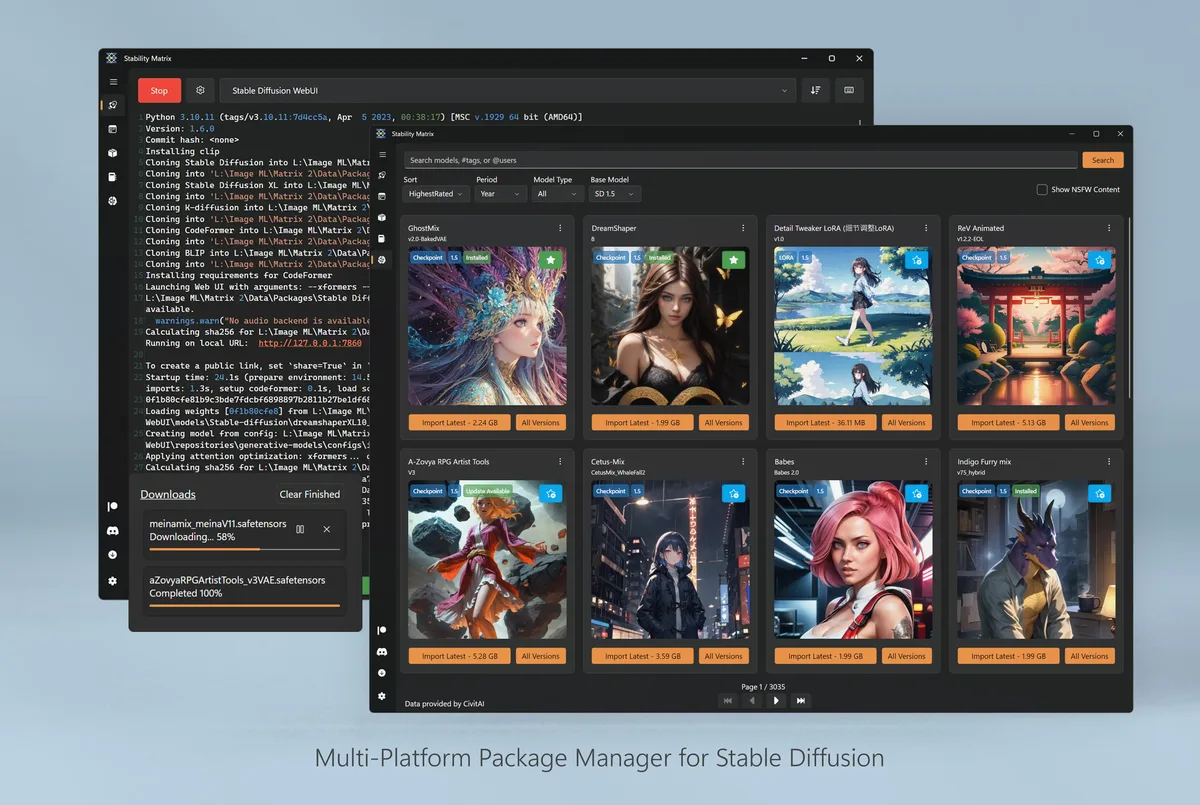
Use this page to pick the Stability Matrix asset that matches the machine in front of you. The AI image generator job is the same; only the file name changes. Home hub: AI image generator.
Windows 10 or 11, 64-bit
Download StabilityMatrix-win-x64.zip from LykosAI/StabilityMatrix Releases. Extract to a folder you control, then run StabilityMatrix.exe. No winget id was verified for this guide. Longer walkthrough: Windows install.
macOS on Apple Silicon
Download StabilityMatrix-macos-arm64.dmg. Open the DMG, complete Gatekeeper prompts, and launch once. If you are on Intel macOS, stop and check whether upstream has published a matching asset before you force the arm64 build. Guide: macOS install.
Linux x64 desktop
Download StabilityMatrix-linux-x64.zip, extract it, run chmod +x on the AppImage, then launch. Arch users may prefer the AUR package stabilitymatrix after reviewing the PKGBUILD. Guide: Linux install.
After the file lands
Confirm the data directory, install one package, and generate a tiny test image. First hour checklist: installed. Safe download habits: download safe. Asset table: releases.
GPU and driver notes
The launcher can install packages that expect CUDA, ROCm, DirectML, or CPU fallbacks depending on what you pick. Install GPU drivers from your hardware vendor before you blame the AI image generator for a failed package. A CPU-only first launch still proves the menus work.
Disk space planning
Leave room for packages and checkpoints. A clean AI image generator install can grow quickly once you import several models. Keep the data directory on a drive with tens of gigabytes free when you plan real work.
| Machine | Asset | Next step |
|---|---|---|
| Windows x64 | StabilityMatrix-win-x64.zip | Extract and run exe |
| macOS arm64 | StabilityMatrix-macos-arm64.dmg | Open DMG |
| Linux x64 | StabilityMatrix-linux-x64.zip | Run AppImage |
Shared and locked-down PCs
School or office images may block unknown apps. Use a machine you administer when you need a clean AI image generator path. Document the approved asset name for the helpdesk so students are not sent to adware SERPs.
Portable habits
Because the Windows build is a zip, you can keep the folder on an external drive with the data directory beside it. Test that move once before you rely on it for travel. README calls out a portable data model for exactly this case.
- One asset per machine
- One data directory you can name from memory
- One update door on GitHub Releases
When cloud is enough
If you cannot install software, a browser studio may be the only option today. Compare tradeoffs on local vs cloud and vs browser AI tools, then return here when you control a PC again.
Proof of success
Success on this computer means the launcher opens, one package starts, and you know which asset you used. That proof beats collecting three installers “just in case.” Troubleshooting: troubleshooting.
Operational checklist
Before you hand a machine to someone else, write down the AI image generator asset name, the data directory path, and the package you proved. Those three lines prevent adware shortcuts and confused helpdesk tickets. Prefer GitHub Releases for LykosAI/StabilityMatrix whenever the next upgrade is due.
If policy blocks unknown binaries, stop rather than force a wrapper. Use an approved cloud studio temporarily, then return to the local AI image generator path when you control the PC again. Independence from upstream means this guide can recommend hygiene without replacing official support channels.
Storage and backups
Checkpoints and packages grow quickly. Keep the data directory on a volume with free space, and back it up before reimaging. A portable layout helps when you move an AI image generator library between disks, but only after you confirm launches still work.
Document GPU driver versions beside the asset name when your shop cares about reproducibility. Driver mismatches look like mysterious package failures. Fix the environment before you replace a healthy launcher zip.
- Match filenames on Releases.
- Prove one package after every upgrade.
- Keep one update door forever.
Repeat the proof after every OS reimage: open the AI image generator launcher, confirm the package list, and run a tiny generation. That habit keeps GitHub Releases as the only trusted door and keeps Softonic-style mirrors out of the workflow.